Stop drifting
Make your priorities survive the week.
Outcomes OS gives founders, operators, builders, and ambitious professionals one place to set direction, run the day, review the truth, and correct the week before important work disappears again.
Inside Outcomes OS
The Command Center keeps today's decisions and open loops visible.

The problem
Your week keeps renegotiating the plan.
Priorities get buried under incoming work, commitments scatter across tools, and the review you meant to do never happens. By Friday, the week was full but the important work is still waiting.
You start the day reactively.
Slack, email, text messages, and other people decide what gets your attention before you do.
Your priorities disappear under pressure.
You know what matters, but urgent noise keeps pushing it out of view until another week is gone.
You stay busy without moving anything important.
The day feels full, but your real goals do not feel any closer by the time you shut your laptop.
You repeat the same mistakes.
Without a review loop, missed commitments and bad patterns come back again wearing different clothes.
Drift explained
Drift is quiet enough to look normal.
It is the slow distance between what you said mattered and what the week actually received. Nothing explodes. The important work simply keeps moving to tomorrow.
Where ordinary tools stop
A complete list can still produce a wasted week.
Storage is useful, but the week also needs decisions: what matters now, what moved today, what slipped, and what changes next week.
The cost
A missed priority rarely stays isolated.
Carryover creates more carryover. Decisions stay open, strategic work gets delayed, and every new plan begins under the weight of the last one.
Drift kills trust in yourself.
Every promise you make to yourself and fail to keep makes the next promise harder to believe.
Drift compounds quietly.
One reactive day becomes a reactive week. One unfocused week becomes a quarter that never quite lands.
Drift creates identity friction.
The gap between who you know you could be and what your days are producing starts to feel heavier than it should.
The solution
Outcomes OS gives the week a working rhythm.
Set direction, choose the day, keep work visible, close the loop, and use what happened to make the next week sharper.
Clarity
Know what matters before the day starts.
Execution
Turn intent into visible action while energy is still available.
Correction
Use the evidence from this week to tighten the next one.
Daily clarity
Know exactly what matters before the day starts.
The Command Center turns scattered intent into a visible operating surface so your best work stops getting buried.

Operating loop
Five decisions keep the week connected.
The loop is short enough to run when work is heavy and specific enough to show you where execution broke.
See what matters
Start from goals and priorities, not from whatever showed up first.
Clarity before reaction
Decide the day
Translate intent into a focused Top 3 and a cleaner execution surface.
Commit before chaos
Review the truth
Close the day with an honest record of what moved, what slipped, and what comes next.
Make the day useful
Reset momentum
Catch slippage early and make the next week easier to execute than the last one.
Reset while it is fresh
Direction
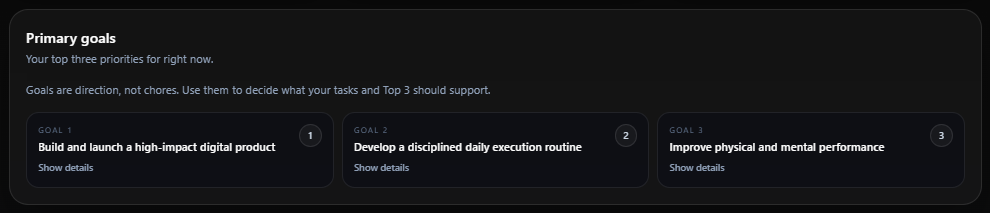
Keep your biggest priorities in front of you.
Primary goals stay visible while you plan, keeping routine work from swallowing the day.

Honest review
Give every day a clean ending.
Nightly Review gives the day a proper close so wins, lessons, gratitude, and tomorrow's focus actually shape what happens next.

Execution truth
See where follow-through keeps breaking down.
Task history makes dropped commitments visible so drift cannot hide behind a vague feeling that you were busy.

Support
Get the next right nudge before momentum slips.
Daily coaching reads the state of your week and points out the move most likely to restore traction.

Founder story
I built this after watching good plans disappear inside ordinary weeks.
Running a business, doing client work, and carrying a life outside the laptop exposed the same failure point again and again: important work was clear in my head but poorly protected in the calendar. Outcomes OS grew from the operating rhythm I built to fix that.
The mission is simple.
Help serious people close the gap between what they know they are capable of and what their days are actually producing.
That means fewer reactive mornings, fewer abandoned priorities, more honest reviews, stronger weekly resets, and more trust in your own follow-through.
What changed
The week stopped being a blur of good intentions.
Priorities became visible, missed commitments left a record, and the weekly reset gave every rough week a clear ending.
Free workbook
Take The Drift Audit
Find out where momentum is leaking, where execution is breaking down, where goals are slipping, and where your priorities keep getting buried.
Start with an honest reset
Get The Drift Audit and stop guessing why execution keeps slipping.
Enter your email to get the audit, identify your biggest sources of drift, and see the system that makes follow-through easier.
Free workbook. Instant access. No account required.
Pricing
Diagnose the week, then run the system.
The Drift Audit shows where traction is leaking. The 14-day trial gives you two real weeks to see whether Outcomes OS improves the way you operate.
Drift Audit + Trial
Find Out Where Your Momentum Is Leaking
Use the Drift Audit and Operator's Weekly Reset to find the exact points where your week loses traction, then bring that diagnosis into Outcomes OS.
Take The Drift AuditFounding Member
Run the full weekly system
Build your system first. Start your 14-day trial with no credit card required and no automatic charge. Upgrade only if Outcomes OS helps you follow through consistently.
Start Your 14-Day TrialFounding Members lock in $7.99/month before new-member pricing moves to $19.99/month.
Start free with the Drift Audit. Upgrade when you want the full execution system working every day.
FAQ
Straight answers before you start.
Is this just another task app?
Task apps are useful for storing work. Outcomes OS adds the operating rhythm around that work: priorities, daily execution, review, and weekly correction.
Who is this for?
It is for founders, operators, leaders, builders, and ambitious professionals who are capable of more than their current execution is producing.
Is Outcomes OS a replacement for my task manager?
No. Outcomes OS is designed to sit above your tasks and help you decide what matters, maintain focus, review reality, and prevent drift. Many members continue using their existing task tools alongside Outcomes OS.
Why have other systems not worked for me?
Most systems are easy to set up and easy to ignore. Outcomes OS keeps priorities visible and makes review part of the week, so missed commitments leave evidence you can act on.
Do I need to overhaul my whole life to use this?
No. Set your priorities, plan the day, close it honestly, and run one weekly reset. The structure stays compact on purpose.
What happens after the 14-day trial?
You can become a Founding Member for $7.99/month and keep that rate as new-member pricing moves to $19.99/month. Your workspace remains intact if you do not upgrade right away.
Do I need a credit card to sign up?
No. You can create an account and start your 14-day trial without entering a credit card.
Will I be charged automatically after 14 days?
No. Outcomes OS does not collect payment information when starting a trial, so there is no automatic charge when the trial ends.
What happens to my data?
Your workspace remains intact. If you decide to upgrade later, your data is still waiting for you.
Final CTA
Another week will fill itself. Protect what matters before it does.
Give Outcomes OS two weekly cycles. Set the priorities, run the days, review what happened, and decide from evidence.
Take the Drift Audit or start your free trial and build a system that helps you follow through consistently.